In 2024, I posted about how I designed and built a computer based on the Intel 8088 CPU. I achieved my objective of playing Civilization under MS-DOS, but a few issues remained that I really wanted to address.
There were (self-inflicted) constraints in the bug-fixing pass: the main one was that I wanted to do just one more fabrication run.
That meant I had to invest time in fully testing the circuits and validating that they would work, without being able to say, “I’ll fix that in the next revision.” As you can imagine, I was eager to make this final run count. And rather than just fix bugs, I couldn’t help but want to add a couple of features, too.
This is Part 2: all the tweaks I made to reach the “end” of this project.
A Faster Clock
I originally used a 4.77 MHz CPU clock, much like the original IBM PC XT that inspired the design. The 8088 CPU is capable of speeds up to 8 MHz, and the NEC V20 variant of the 8088 can even run at 10 MHz! In a world where we’re used to measuring CPU clocks in GHz, being able to eke out even a slight boost in CPU speed felt like a vast improvement.
The new design splits the clocks into two sources:
A 14.31818 MHz clock for the ISA bus OSC reference signal, which must remain four times the NTSC color burst frequency for compatibility. This clock also feeds dividers for the Programmable Interval Timer, ensuring applications can still run delays with approximate millisecond accuracy.
A clock for the CPU, which can be swapped out easily.
I implemented the newly split clocks with the option to choose between a crystal and an oscillator by swapping an IC and a jumper. So far, I’ve used only oscillators, which have been significantly easier to stabilize, and left the crystal-supporting components (capacitors and such) unpopulated on the motherboard.
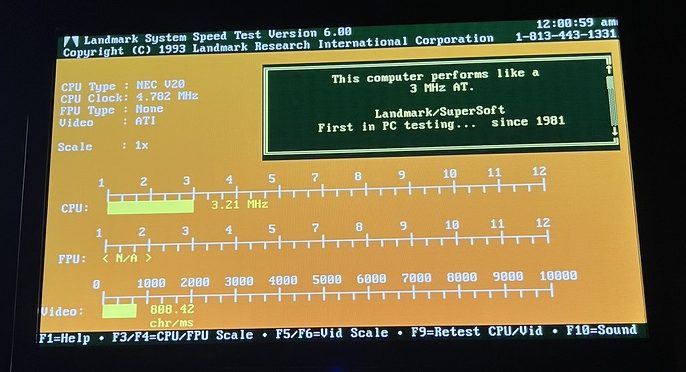
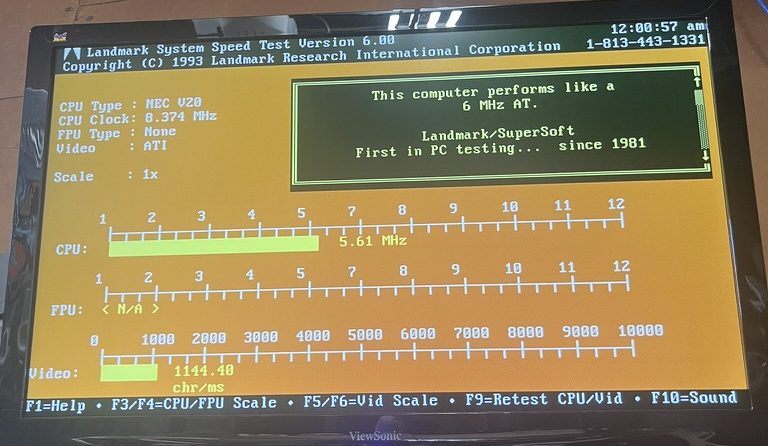
Before: NEC V20 with the traditional CPU clock at 4.77 MHzAfter: NEC V20 with an 8 MHz clock via a swapped oscillator
The end result is that I can run my computer at 8 MHz (using a 24 MHz oscillator), without affecting the performance of devices on the ISA bus.
More Memory
MS-DOS can use Upper Memory Blocks for drivers and system software so more of the 640 KiB of conventional memory is available for applications. My previous design had limited support for memory in this area, as the memory address decode circuitry ignored most of these addresses.
I added a socket for an additional memory chip that sits in this upper memory area. It can be disabled with a jumper in case the same memory area is needed for an ISA card, but otherwise offers space for MS-DOS to load drivers. I’ve used this very effectively to squeeze larger applications into conventional memory – it was immensely helpful for Borland Turbo C, for example, which previously required unloading some software to run correctly.
All memory slots fully populated, including the upper memory block chip slot.
ATX Fan Headers
I wanted to be able to run fans in the case without having to use power supply adapters, so I added fan headers like those seen on modern motherboards. These simply provide 12V of DC power to ATX case fans. There’s no PWM control facility, so these just run at full speed, which is more than sufficient to keep air flowing around the heat-generating components.
I2C Connectivity
Interfacing to external devices was previously limited to adding a serial or parallel port via the ISA bus. I wanted to be able to drive more complex modern devices, so I added I2C connectivity to the motherboard, in the form of several STEMMA connectors. I’ve been able to interface with external devices such as LCD displays from MS-DOS – it opens up quite a few interesting opportunities.
There are both internal and external connectors to allow for I2C peripherals to sit where they make the most sense. For example, the internal connector allows experimenting with an internal real-time clock connected via I2C to give MS-DOS time-keeping abilities without having to add an actual real-time clock circuit to the motherboard.
I’ve enjoyed the I2C connectivity so much that I have designed and built an ISA-to-I2C bridge card, which I have published on my Tindie store.
A preview of my ISA card for ISA-to-I2C connectivity.
M88.Computer & GitHub
Finally, while it isn’t hardware, I went ahead and spun up https://m88.computer as a hub for information about the computer and its design. The site and the manual I’ve been crafting are still under construction, but all the critical details are there.
You can also find everything – KiCad projects, BIOS source code, and more – on GitHub at https://github.com/miselin/m88.
What’s Next?
No more revisions! I have enjoyed the fruits of my labor after burning many of 2024’s evenings and weekends on it. I’ve been using the computer to play Civilization, of course. I’ve also enjoyed developing software with Turbo C and experimenting with the new I2C connectivity as if my computer were a little Arduino.
The journey has been absolutely fascinating. Now… on to the next projects…
A while ago, I stumbled onto this blog post by Alexandru Groza that described the author’s journey to build their own 80386 single-board computer. It felt insurmountable to tackle such a project – while I have in the past successfully repaired simpler computers (like Commodore 64s), an entire computer build from schematic through to running real code felt out of reach.
I had good reason for it to feel out of reach, too. In the past, I designed some schematics and had PCBs manufactured by OSH Park. These were simple designs to add custom options to my selection of audio engineering equipment. These were as simple as a little diode clipper and even included a low-cost preamp. However, they often did not work! It was difficult to justify continuing to invest time and money into designs that were faulty from the outset.
Fast forward a few years. I had read a few more books, learned a thing or two. I designed some simple schematics and had them built by PCBWay for a fraction of the cost I had previously been paying. This time, drawing on a much better foundation of knowledge, these designs actually worked. Sure, there were mistakes and errors in the schematics and PCB layouts. But crucially, these mistakes were not fatal and could be easily worked around (and fixed in later revisions).
At the same time, I saw products like the Commander X16 gain traction and found myself fascinated by single-board computers like the Feertech MicroBeast. While I was intrigued by the computers themselves and the effort taken to build and release them, these all had the same problem for me: they were nostalgic for a different era than I’m nostalgic for. The computing era I’m most nostalgic for is the one I grew up in, messing with MS-DOS and early Windows. I understand the appeal of the Z80 or 6502 CPUs and computers like the Apple II or TRS-80. I own three Commodore 64s, each of which I have taken the time to repair to full functionality1.
I stumbled on the datasheets for the Intel 8088 CPU, and something finally clicked. It looked familiar, like the 6502 or Z80 in the other computers I was fascinated by. Inspired by the story of Alexandru’s 80386 computer, I finally knew I wanted to build a computer around the 8088 for myself. Further reinforcing the viability of this project, I learned about the Book 8088, a custom laptop built around the 8088 CPU. If they could do it, so could I.
I’ve done enough projects to know to set a clear target to avoid the temptation to infinitely iterate, so I set a clear goal: it had to allow me to play a full game of Sid Meier’s Civilization.
I recognized that achieving this goal would require PC compatibility. I elected to compromise on designing certain elements: for example, I would have an ISA bus for expansion cards to support disks and video graphics, rather than trying to build those circuits myself. With that decision in mind, I focused on building something that would fit into a common ATX case, just like any other motherboard you might buy today.
The rest of this post will dive deep into the journey, but if that feels like a lot of reading… in summary, it worked.
I have built my own computer on which I can play Civilization.
The computer running Civilization.The prototype board. The missing chips went to the main motherboard once it arrived.A better view of the motherboard itself. The bodge wires fix a handful of schematic bugs.
The First Prototype
I chose to implement my computer around the 8088 CPU rather than the very similar 8086 CPU primarily because the 8088 has an 8-bit data bus, and I imagined that would simplify the PCB layout. Running the CPU in “minimum mode” also simplified my design, at the cost of being unable to ever add a floating-point coprocessor to the computer. This also meant that reference materials such as the IBM 5150 PC technical reference manual were only partially helpful in validating my own design: those PCs ran the CPU in “maximum mode” to allow for coprocessors, so the signals weren’t a perfect match.
A fully PC-compatible computer has a wide range of devices on the motherboard itself. These include programmable timers, interrupt controllers, DMA controllers, keyboard and mouse controllers, and supporting logic for peripherals like the classic PC speaker. I knew that it was a long shot to design a schematic on my first attempt that handled all of this without any errors. Instead, I cloned my main schematics and designed a prototype board with a core set of functionality.
This prototype board still had key peripherals: the programmable timer, interrupt controller, and chips to support a single 7-segment display that I could use to debug if needed. It also had pin headers that allowed for direct access to the address and data busses, as well as a few important control signals. These pin headers, I reasoned, would allow me to connect a breadboard to test my upcoming motherboard schematics.
I went ahead and had the prototype manufactured and immediately discovered I had made a major error: the 74LS154 chips I was using to de-multiplex the address bus for memory and I/O access were a completely different footprint, being twice as wide as I was expecting. I was able to find narrow chips online, fortunately. Until those arrived, I used a breakout breadboard to house these wide chips.
In the photo above, the spaghetti mess of cables is caused by both the breadboard fix for the de-multiplexers, and the logic analyzer I use to further troubleshoot the system. The error with the de-multiplexers stung more when I discovered that I had erroneously selected a 4-to-16 variant, meaning the 128KB of RAM I thought I had on this prototype was actually going to cap out at 64KB. That didn’t matter for the prototype, but it was still a reminder for me to pay better attention in the schematic design phase.
The 7-segment display proved to be invaluable for troubleshooting. Using a 4-bit latch proved to be a mistake, however, as 4-bit latches or registers were not easy to find in stock. Lesson learned – check the stock before you commit your design to a particular logic chip.
Most of the rest of the design worked exactly as intended. While I don’t have photos, I was able to use the pin headers exactly as intended to break out the necessary signals to another breadboard to test my keyboard controller circuits.
The prototype served its purpose: I was able to use it to test the core assumptions of my schematic and identify errors that needed to be addressed before making a full run of the much more complex motherboard I originally envisioned.
Interlude: The BIOS
To be able to do anything at all, my computer needed a BIOS. Given I was already building my own computer from scratch, the not-invented-here train had definitely left the station… So, of course I went ahead and wrote this myself.
I’m no stranger to writing low-level x86 code. I have spent a lot of time deep in kernel code for projects like the Pedigree Operating System. This time, there was no BIOS already present to depend upon! It was also a unique challenge to write BIOS code in that early environment, before it can even be assumed that RAM is functional.
The BIOS is 100% assembly code. I tried messing with the Digital Mars toolchain to write 16-bit real mode C, but ultimately found it easier to just write assembly code myself. I crafted some custom tools to help with generating the ROM images, but other than that I landed on a fairly typical NASM + GNU Binutils toolchain.
An example routine from the BIOS follows. There are around 3.5k lines of assembly at the time of writing this post.
int16_12:
    ; AH = 0x12 - Extended Get Keyboard Status
    push bx
    push ds
    mov ax, 0x40
    mov ds, ax
    mov al, byte [ds:0x17]
    mov ah, byte [ds:0x18]
    and ah, 0x73                        ; keep LCTRL, LALT, state bits
    mov bl, byte [ds:0x96]              ; grab extended bits for RCTRL/RALT
    and bl, 0x0C                        ; keep only RCTRL, RALT
    or ah, bl
    pop ds
    pop bx
    iret
To test that my BIOS was mostly on the right track, I took advantage of the popular Bochs PC emulator. I ran tests in two modes. The first mode, pictured below, used my BIOS as the main emulator BIOS, which helped flush out bugs in initialization that would be difficult to track down on the real hardware.
The second mode, pictured below, loaded my BIOS as an “Option ROM.” My code handled this case by avoiding all the system initialization procedures and simply overrode the BIOS system services instead. That allowed me to lean on the standard BIOS ROM to provide all the disk management and core functionality while I worked on getting my BIOS services to be compatible with MS-DOS.
This saved a ton of time. Being able to rapidly iterate with an emulator meant that every time I would load the BIOS on my computer, I had much more confidence that it would actually work. This also helped distinguish potential hardware bugs from software bugs.
While it’s never fun to have a session on my computer end due to a catastrophic software bug, every one of them leads to improvements that make future sessions even more stable. I don’t think too much about the software while I’m playing Civilization for hours on end without a fault, and that’s worth all the crashes and bugs to get here.
The Motherboard
Having succeeded with the prototype, I shifted focus to the first revision of the motherboard. This was going to be significantly more featureful compared to the prototype, and it needed to be! The goal was to run MS-DOS and a game, after all.
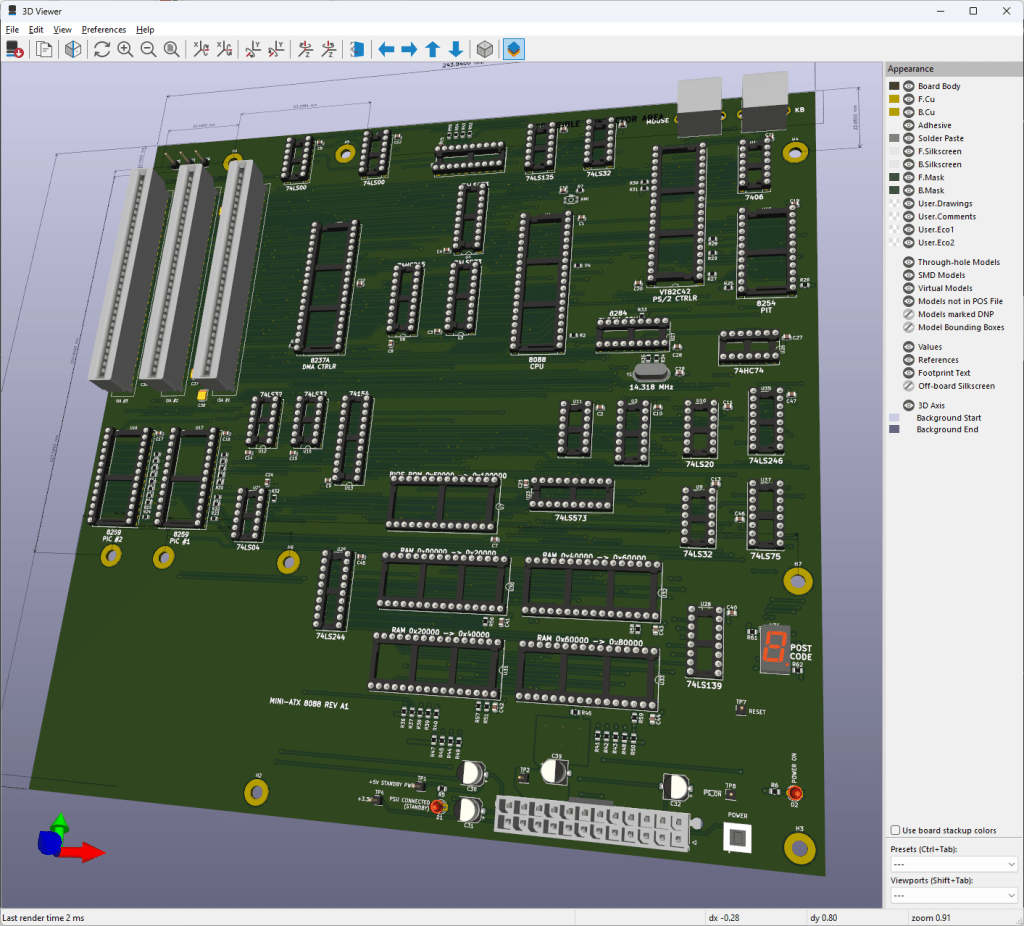
KiCAD is my design software of choice. This image is not the final layout but one of the early 3D renders of the motherboard during the design process.
I ended up having JLCPCB manufacture these boards. These are 4-layer PCBs, and JLCPB’s pricing on 4-layer boards was very difficult to beat.
The first revision of the motherboard has a range of features:
A basic system management controller using an ATtiny chip1 to handle ATX power signals and control the reset lines of the computer
On-board PS/2 ports for keyboard and mouse
4 128K RAM sockets
1 64K ROM socket for the BIOS ROM
3 8-bit ISA card slots
PC speaker connection
Two 7-segment digit displays for POST codes and debugging
I elected to use surface-mount components for most of the resistors and capacitors that make up the design. All of the sockets, the ISA card slots, resistor packs, and PS/2 keyboard circuitry are through-hole components and require quite a lot of soldering. At this time, I also made the unfortunate discovery that I had erroneously flipped the footprints for the PS/2 connectors, making them unusable in this design. Alas – the next revision I build will have this fixed!
Here is a photo of the early board bring-up. The ATtiny in the bottom right was programmed and tested, and the rest of the motherboard was populated aside from just one chip that I missed in my original bill of materials.
Here, we have a few ISA cards in place – a Trident VGA card, and a serial/parallel interface card. Having a serial port proves useful for troubleshooting, especially if there are issues with the VGA card. The Trident VGA card is actually a 16-bit ISA card, but it autodetects an 8-bit bus and falls back to 8-bit mode.
Early on, I encountered some minor problems with the VGA card caused by a bug in the routing of the ISA bus READY line. ISA cards use this READY signal to extend the duration of memory accesses, allowing them to complete their own internal transactions if they are slower than the 8088’s normal memory access timing.
Having read plenty about CGA and its tendency to “snow”, I immediately recognized this kind of corruption as potentially caused by incorrect bus timing. Thankfully, I was right! In my schematic, the READY signal was going to the right place – the Intel 8284 clock generator chip. This chip takes care of generating digital clock signals and also generates the CPU’s RESET and READY signals. However, I misconfigured the secondary 8284 ready lines, causing it to always consider the bus as ready! A quick bodge to fix the misconfiguration allowed the READY signal to work again.
Hey – that’s MS-DOS! Yes, at this point the system was functional enough to make it all the way to the MS-DOS prompt. During early development, I left several BIOS services unimplemented and had them simply write to the screen. This let me make progress while still being able to track what was missing.
And finally, after all the fixes and patches, I was able to run Civilization on the computer!
What Bugs Remain?
I have one more revision of the motherboard that I’m preparing to produce. The current motherboard has a range of bugs – just look at all those wires! – and I would love to land on a completed design that doesn’t require quite so many bodge wires.
But what’s buggy?
Bug #1: DMA Controller
The DMA Controller was the controller that instilled the most fear in me during schematic design. It works by asking the CPU to completely release the bus, at which point it takes care of all the bus signaling. That means getting things wrong in the DMA schematics can lead to a totally frozen system.
Fortunately, while I did get it wrong, my mistakes don’t totally lock up the system.
The most significant bug I implemented in my schematic only appears during an actual transfer. 8088 CPUs generate a handful of control signals that my schematic converts into four overall signals to control the bus. These are IOR (I/O Read), IOW (I/O Write), MEMR (Memory Read), and MEMW (Memory Write). I made a faulty assumption that I could save some logic gates and use IOR/IOW to decide whether or not to enable memory. This works in general! However, during a DMA transfer that writes to system memory, the DMA controller will signal both IOR and MEMW. It does this because IOR will cause the device to generate data, and MEMW will cause that data to be written to memory.
That IOR signal is how a DMA transfer actually gets data from a device, so my attempt to optimize the gates backfired – IOR becoming active will disable all memory access, meaning the DMA is DOA!
My revised schematic fixes this by allowing IO and MEM signals to be active concurrently, using signals generated by the DMA controller to assist in disambiguation. I still have some testing to do with the DMA signals on the current motherboard before I feel confident getting the next revision manufactured.
Bug #2: PS/2 Port Mistakes
I have two major mistakes in my keyboard controller circuits.
The first major mistake is that I flipped the PS/2 port footprints on the PCB, which swapped the +5V power supply and the Ground pin. Thankfully, I have a resettable fuse on the power line for the PS/2 ports. This helped avoid causing problems elsewhere on the motherboard when I first plugged in a keyboard. It is an easy fix.
The second major mistake is that I forgot to place pull-up resistors on the output pins of the 74LS06 inverter chip that actually drives the signals to the keyboard or mouse. This chip is necessary to allow a single wire to carry bidirectional signaling between the computer and the keyboard, and without the pull-up resistors, neither device can correctly sense the state of the wire to know when it’s safe to transmit.
Both of these are fairly easy to fix in the schematic and the layout, but required a handful of bodges and extra soldering to fix on my first set of motherboards.
Bug #3: Incorrect Chip Selects
On PC-compatibles, the keyboard controller sits at I/O ports 0x60 and 0x64. In between those ports lies PC speaker control and a few other legacy ports. Ports between 0x70 and 0x7F include those used to control a real-time clock, if present.
My original schematic naively ignored most of these ports. That meant anything that tried to use the PC Speaker would send garbage to the PS/2 Controller, causing all kinds of problems with the keyboard logic. The revised design will use additional de-multiplexers to correctly distinguish I/O ports in this range.
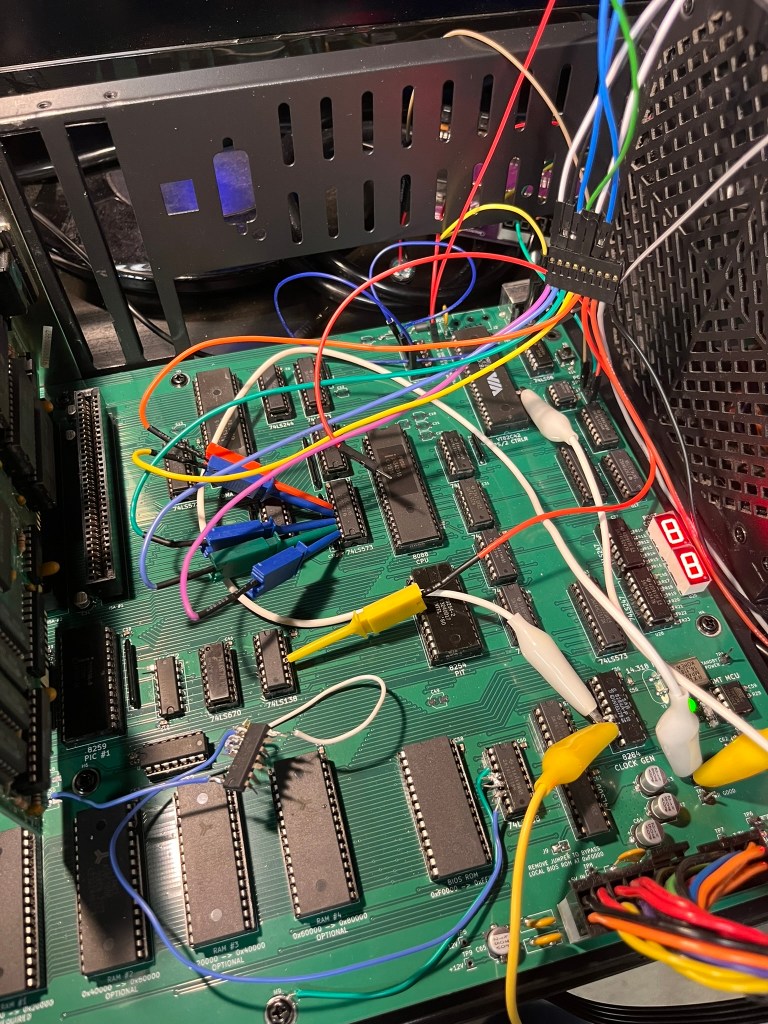
This bug is actually the cause of the majority of the cable mess. I used an FPGA to implement the correct logic for port selection, which required connecting up signal lines, power, ground, and a 3.3V to 5V bidirectional level shifter as my computer’s signals all run at 5V. It’s messy. But without it, I won’t have a keyboard, and without a keyboard, I can’t achieve my goal of playing Civilization!
What Did I Learn?
I learned a lot!
You’ll always find at least one error in your design moments after you submit your design for manufacturing (at which point, you can’t change a thing)
Break out important signals to test points so they can be easily analyzed once the system is running
3D-print the PCB as a single-layer sheet to make sure every mounting hole is in the right spot (one of mine isn’t) – it’s cheap and fast
Find ways to get feedback early. The 7-segment digits on both PCBs have been invaluable to track down problems that would have otherwise been invisible
Use a ZIF socket for your BIOS ROM. It’s going to be annoying to keep removing it every time you make a software tweak
What’s Next?
Once I close out the next set of schematic revisions and get another set of motherboards manufactured, I’m sure I’ll find a few more issues that need attention. I’m slowly improving at this, but as you can see above – there’s still plenty of room for bugs to sneak in along the way. Fortunately, many of them can be mitigated with just some crafty wiring or a software patch.
The next revision will have a fifth RAM socket, so I can actually install 640KB of RAM. It makes a big difference!
I am also planning on adding an expansion header for adding ISA riser cards to the machine. Three card slots fit into my current design, and I don’t really want to make the PCB much larger for cost reasons. But three card slots isn’t a lot! I want to run my XT-IDE (for disk), Adlib compatible sound card, Trident VGA card, EMS memory expansion… you get the idea. I already have a basic design for a custom header and riser card that will allow me to add an additional 3-4 cards. Once I have the sockets in the design, the only limit is the size of the ATX case!
Once the next version of the motherboard is built and tested, I plan on releasing the source code for the BIOS and the KiCAD projects for the motherboard. I can’t promise that it’s the pinnacle of electrical or software engineering, but this computer ultimately achieves the goal I set for myself.
This is technically not completely true – one of them needs a replacement SID chip for audio to work. However, the rest of the system is fully functional. ↩︎
The ATtiny comically runs at twice the speed of the main 8088 CPU in a miniature footprint. ↩︎
The other major holiday project I worked on over the end-of-year break was to take my 3D engine and build something with it. I have a lot of little tech demos and ideas but nothing that’s actually “finished”.
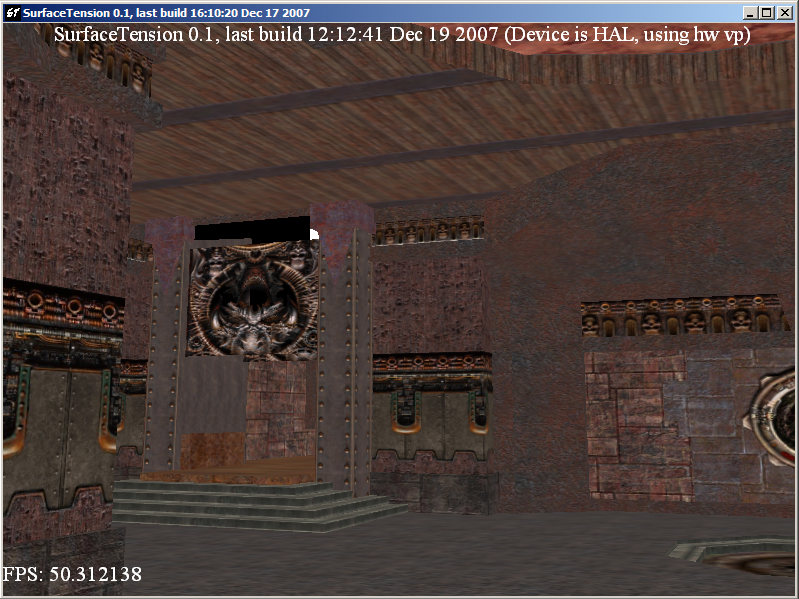
Many years ago, I worked on a 3D engine that ended up being capable of loading Quake 3 maps:
So I thought – why not do what I didn’t do in 2007 – actually build something that is more or less a clone of Quake 3?
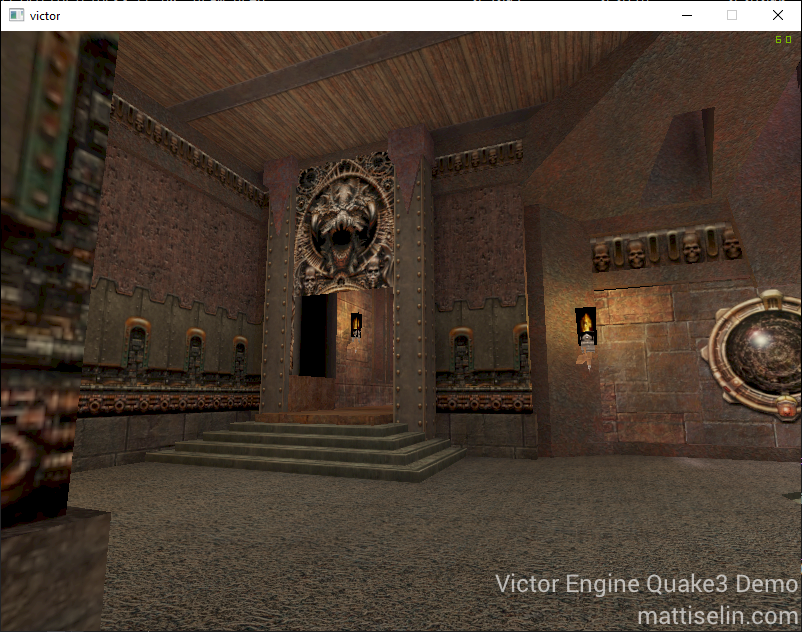
Well, I managed to get a little further than I did in 2007 to start with – with working lightmaps for example:
OK, but rendering a Quake 3 map is just scratching the surface of making a game. What’s more, Quake 3 BSP maps have more than just blocky rectangular geometry – they have Bezier surfaces to create curved geometry at runtime. Back then, this let id offer a geometry detail slider to let weaker computers reduce tessellation and get less-round round surfaces. Nowadays, that’s less of a big deal, so I thought I’d take it a little further.
Tessellation
Rather than write code to grab these Bezier surfaces (defined by 9 control points), and tessellate them at load time, I thought this would be a great opportunity to learn how to write OpenGL tessellation shaders.
It took a little while to wrap my head around the surfaces, which did involve drawing several example surfaces in a notebook (always keep a notebook near your keyboard!) and recognizing the characteristics of the control points and how they resulted in curved geometry.
Once I managed to figure that out, and load the control points in the correct order from the BSP file (again…. pen & paper), I was able to put together the shader:
The results worked out great, and it was very satisfying to use this as an opportunity to build out support in my 3D engine for tessellation shaders. The only shader type not yet supported is a Compute shader, and I’m hoping to dig into those soon too.
Tweaking the level of tessellation in the tessellation shader shows the impact it has on the curved geometry in the map.
Quake 3 Shaders
Quake 3 (well, idTech 3) allow the use of their own scripted shaders to shade geometry. While many surfaces are textured with just an image (plus a lightmap), shaders allow for significantly more flexibility when rendering. For example, the flames on torches in maps are shaders that set up an animation across up to 8 image files – so with just two quads, a flickering flame can be created.
The shaders also support texture coordinate modification – based on constants or trigonometric functions – used to great effect to create moving skies, lava, or plasma electric effects by just rotating texture coordinates around.
Vertex deformation is even an option – more on that later.
Traditionally, these shaders would require multiple draw passes to merge the layers of the shader into one final visual result. I implemented this at first, but realized my 3D engine already supports “uniform buffer objects” (i.e. buffers of data to be passed to shaders), so I rebuilt my rendering path for Quake3 models and geometry. Now, the Quake3 shader is converted into a structure that contains all the information, texture stages, and other flags related to the rendering. That’s passed to the graphics card where the GLSL shader iterates through the list of stages and renders, performing blending between stages within the fragment shader itself.
The end result is a single draw call for geometry but with all of the same visual results! Combined with bindless textures, the result was a dramatic reduction in draw and bind calls, and no need to sequence multiple draw calls and OpenGL blending stages.
struct TCMod
{
    int mode;
    float p0;
    float p1;
    float p2;
    float p3;
    float p4;
    float p5;
};

struct Stage
{
    /*
     * stage_pack0: packed bitfield with stage shader parameters. 4 bytes.
     * alt_texture : 2 - alternative texture flag
     * blend_src : 3 - source blend mode in this stage
     * blend_dst : 3 - destination blend mode in this stage
     * rgbgen_func : 3 - rgbgen function selector
     * rgbgen_wave : 3 - rgbgen wave to use (if function is wave)
     * tcgen_mode : 2 - tcgen mode selector
     * num_tcmods : 3 - number of tcmods in use
    */
    int stage_pack0;

    // rgbgen wave params (if function is wave) - 16 bytes.
    float rgbgen_base;
    float rgbgen_amp;
    float rgbgen_phase;
    float rgbgen_freq;

    // all our texture coord modification parameters
    TCMod tcmods[4];
};

layout (std140) uniform Game
{
    /*
     * game_pack0: packed bitfield with common shader parameters. 4 bytes.
     * num_stages : 3 - number of stages in this shader
     * direct : 1 - avoid caring about blends and whatnot
     * sky : 1 - rendering sky
     * model : 1 - rendering a model (ignores lightmaps)
     */
    int game_pack0;

    layout(bindless_sampler) uniform sampler2D lightmap;
    layout(bindless_sampler) uniform sampler2D textures[8];

    Stage stages[8];

    // additional transformations to apply beyond the model/vp matrices
    // used for models attached to attachment points on other models
    mat4 local_transform;
};
I packed a number of the parameters into bitfields to reduce the size of the uniform buffer. I had visions of sending the GPU the entire selection of shaders in use and passing only a shader index in the draw call (or perhaps storing it as a vertex attribute), but I ultimately ran into the uniform buffer size limit on larger maps and decided to leave this idea alone.
Vertex Deformation
I mentioned vertex deformation earlier in this post.
Quake 3 shaders allow for vertex deformation, utilizing trigonometric functions to manipulate the vertices of the geometry in real time. This is used for things like flags. This seemed even more like a perfect place to use tessellation shaders – even more than the Bezier surfaces I mentioned above.
This was just a matter of implementing an alternative tessellation shader that would perform the deformations. In the code example below, “q3sin” and such are functions that just call the relevant trigonometric function, utilizing the parameters provided to correctly manipulate the result. In the original Quake 3 source, these were lookups in precomputed tables. Now, I’m just running the functions on the GPU.
if (wave == RGBGEN_WAVE_SIN) d_val = q3sin(base, amp, phase, freq);
if (wave == RGBGEN_WAVE_TRI) d_val = q3tri(base, amp, phase, freq);
if (wave == RGBGEN_WAVE_SQUARE) d_val = q3square(base, amp, phase, freq);
if (wave == RGBGEN_WAVE_SAW) d_val = q3saw(base, amp, phase, freq);
if (wave == RGBGEN_WAVE_INVSAW) d_val = q3invsaw(base, amp, phase, freq);

// deform along the normal
vertex_out.Position.xyz += vertex_out.Normal * d_val;
This works pretty well:
Summary
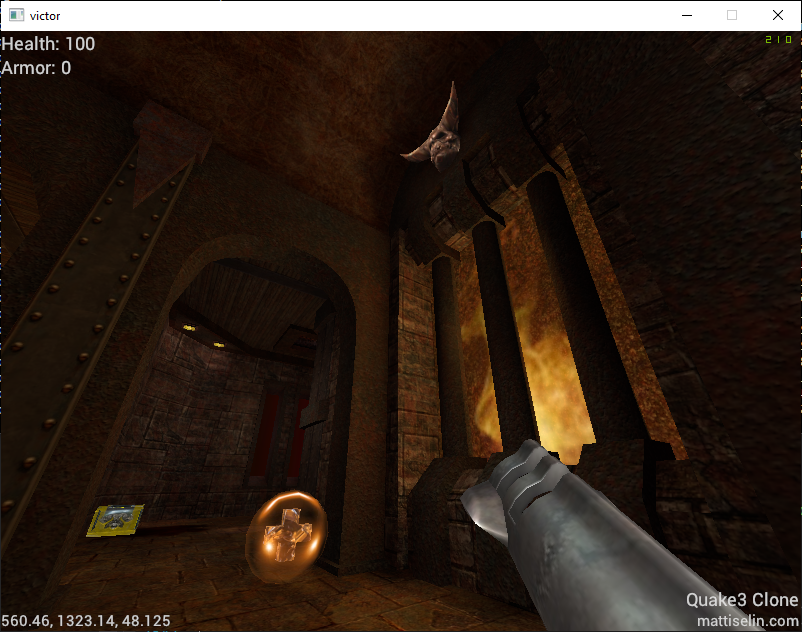
There’s much more work to be done – I’ve been working on getting 3D models loaded and animated, building out the projectile logic so the game’s weapons work, and all that gameplay stuff that turns this from a cool handful of technical demo elements to a playable game.
The main reason I wanted to set this as a challenge for myself is that I can use the assets from the base game to be able to build the clone – I’m not a particularly great artist – and also have a point of reference along the way. At first I thought it was a little strange to build something that already exists, but the extent to which this project has already pushed the edge of my 3D engine and my own thinking about how to build 3D applications has been invaluable.
Here’s to being able to actually play the game soon, though 🙂
Over the new year’s break I’ve been working on a few projects – it’s been a while since I had a chance to get into writing some code for a fun project.
I’m still working on another holiday project – so this might be a bit short on deep technical details – but here’s some of what I’ve been doing.
Raytracer
One project I set out to build was a software raytracer. Having already done some work with 3D graphics (see other posts on this blog), it seemed like an interesting project to take on to see the differences between rasterization and tracing. The vast majority of rendering code I’ve written has been for OpenGL rasterization so it was certainly a change in mental paradigm.
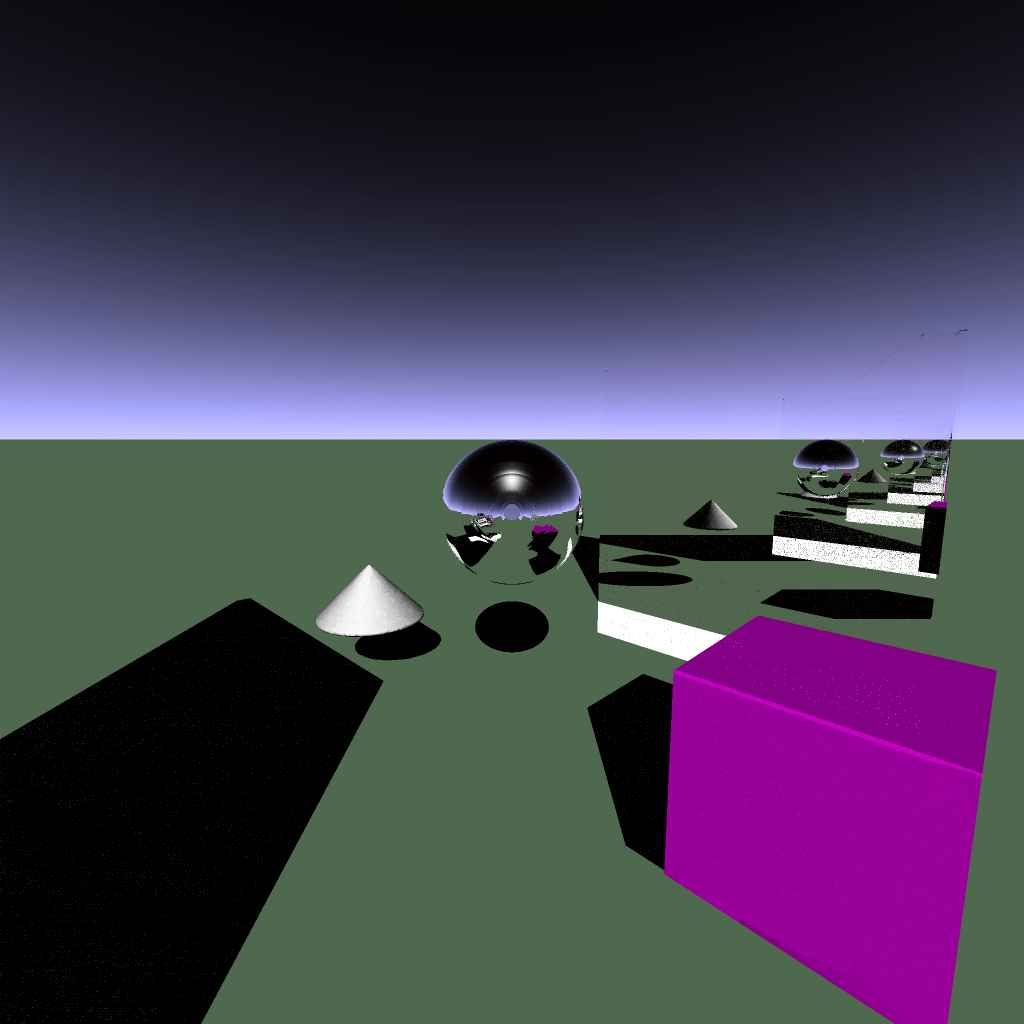
It was fascinating to be able to build scenes with mirrors, reflective surfaces, shadows… coming from rasterization, it felt like “cheating” to just add another light to the scene, or to add a pair of mirrors and have the infinite mirror effect just work.
A demo raytraced scene with a pair of mirrors creating an infinite mirror effect.
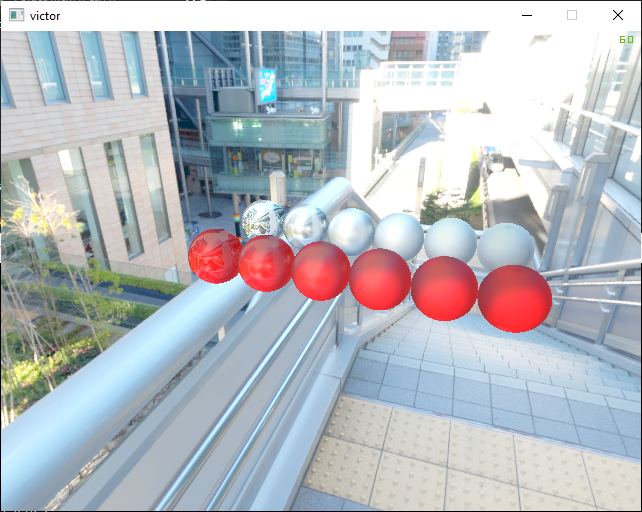
I have a physically-based rendering demo in my 3D game engine source tree that I tried to replicate in the raytracer:
Raytracing vs Rasterized physically based rendering demo. The raytracer is a little noisy – not nearly enough samples (but I was running it realtime).
I had a lot of fun writing the raytracer and for the most part I was able to get it up and running over a weekend.
Physically-Based Rendering
For a long time I’ve been using physically-based rendering in my 3D engine. Over the break I was able to dig into it a little more and fix a number of bugs across the implementation.
One such bug was an inversion of parameters when generating a lookup table texture for the image-based lighting specular calculations. I flipped parameters causing the lookups to return incorrect data, creating inaccurate scenes.
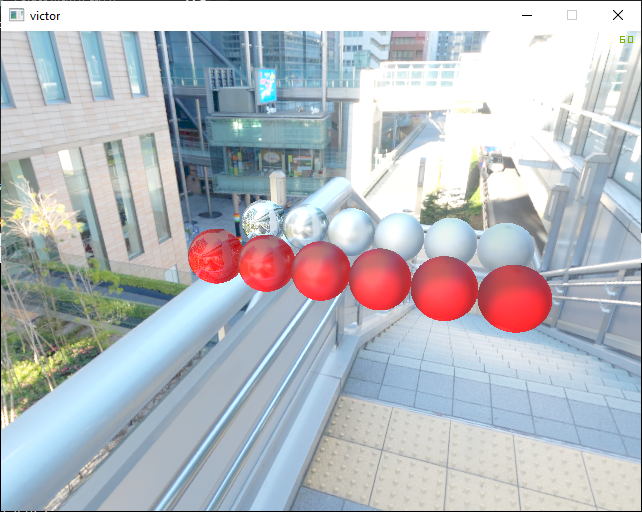
Comparing a buggy BRDF lookup table generation to the fixed variant.
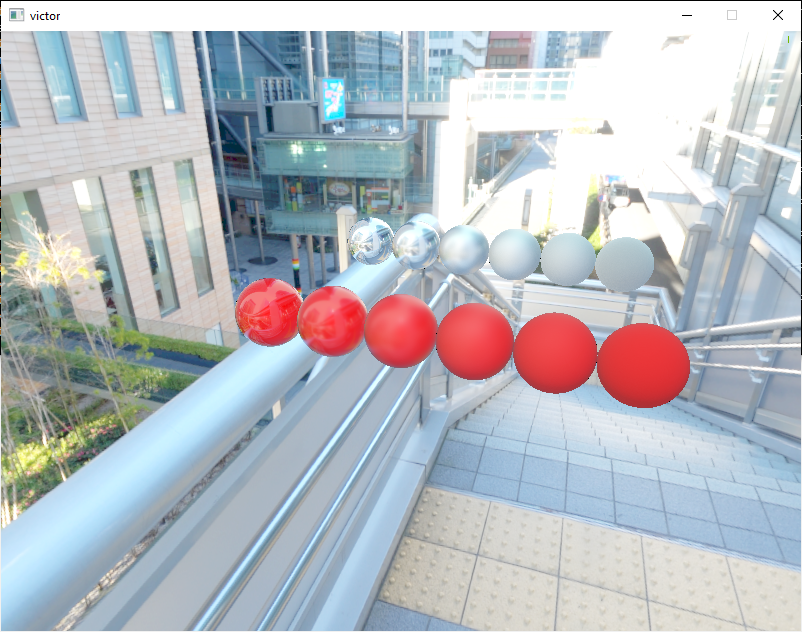
I also spent a lot of time rewriting the equations. I made a fundamental error years ago when I first write the physically-based rendering shaders. The rendering integral was implemented as an equation and never ever worked the way I expected, so I jammed factors and such around until it kind of worked. Working on the raytracer helped me realize it’s an integral – because using mutiple rays per pixel in a raytracer completes a Monte Carlo estimation of the integral – and so I made sure everything was up-to-date in source control and rewrote the shaders.
Comparison of old and new PBR shader.
The results look particularly better on the dielectrics where the roughness scale looks a lot more realistic.
For several years now, I’ve been experimenting with the integration of tech into the houses and apartments I’ve lived in. For the most part, this has manifested as very basic automation – some trivial routines in Phillips Hue, or an auto-off timer on a Wemo power socket, for example.
Well, in the past few months, I’ve been able to dramatically amplify my efforts in this realm by introducing a wide variety of Zigbee and Zwave home automation devices.
Zigbee & Zwave
Zigbee and Zwave are wireless communication systems designed for Internet-of-Things devices, including features like mesh networking and security to create an environment ripe for automation.
The distinction between “secure” and “insecure” tends to follow the categorization of the device – you probably don’t want your wireless door lock to be accessible to anyone nearby that can transmit a Zigbee control code, but perhaps you don’t have quite the same concerns with a temperature sensor.
Both systems require a hub somewhere that owns the network and keeps track of the devices within. The websites of each protocol have information about possible hubs, but I went with a USB variant and connected it to HomeAssistant.
HomeAssistant
HomeAssistant is the “brains” of my home automation. Some folks use OpenHab as an alternative. I run my instance on a VMware server in my garage – you can run yours on anything from a home PC to a Raspberry Pi.
HomeAssistant is the hub through which all of the Zigbee and Zwave devices are communicating, sending their sensor readings and receiving commands. While it can also be used as a dashboard, I personally use a Grafana instance (also on my VMware server) along with InfluxDB and Prometheus instances to collect and present data from around the house.
HomeAssistant also allows automations that can use readings from various devices to make decisions and trigger other devices. For example, I have lights in my backyard that are turned on when the outdoor luminance drops to a certain level (rather than using sunset data), and turn off at 10pm unless there’s motion in the yard. This is just one example of what is possible – I’ve barely even begun to scratch the service in my own usage of HomeAssistant!
Grafana
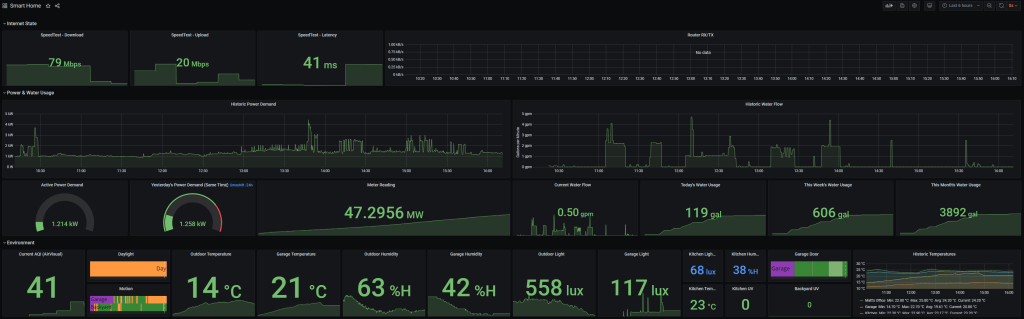
I’ve spent some time building up a Grafana dashboard that I can use as a quick go-to to see what’s happening in my smart home. Internet stats, power and water usage, and environmental data is all available at a glance.
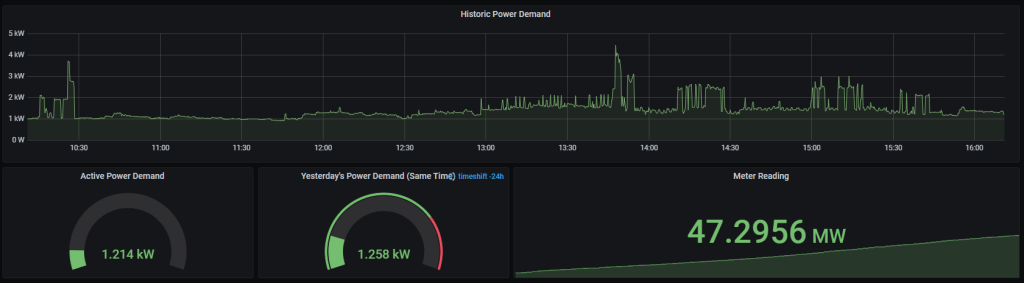
Power Data
My favorite part of this dashboard is the power data. Using a Smart Utility Meter connected to our PG&E meter, I was able to set up a data feed with point-in-time power meter readings. I had to write a little Python daemon to receive the regularly-submitted reports from the meter and push them to my InfluxDB instance, but once this was up and running, it’s been pretty solid! … other than one little bug with units that sometimes reported a power consumption of 1 MW or more – but once that got squashed, everything’s looked very reasonable.
Environmental Data
My second favorite part of this dashboard!
Using a handful of Zwave multi-sensors, I have all sorts of useful data from various locations in the house – temperature, humidity, luminance, motion. Some of these I am already using in automation – the use of dwindling luminance to trigger turning on smart bulbs is very useful – but others are more informational.
I don’t yet use the other data for anything other than my own interest. It is however useful to know what the temperature is around the house, and I can use that to experiment.
Which brings me to…
Experimenting
All this data is useful to satisfy a curiosity, but I’ve been slowly starting to find new ways to make use of it.
Temperature data is useful to figure out if I should wear a jacket today (I should set up a push notification for that…), but I’ve also been experimenting with turning heaters on and off and seeing the impact on the longer-term temperature graphs. This is particularly interesting when looking at ways to trim back cost – heating isn’t particularly efficient, and if it is not making a major difference, that’s a strong signal that we can change our usage of it!
I’ve also used power data to recognize particularly power-hungry light fixtures and identify them as candidates for a bulb conversion. That’s something that’s doable without all this fancy tech, but I love how quickly I can see results – with the dashboard open on my phone, after throwing a light switch, I can see results in seconds and move on to another fixture.
Many folks have used these sensors for even more interesting purposes – calibrating the UV sensors to open and close blinds to protect furniture from UV rays, for example.
I’m barely scratching the surface of what’s possible, but it’s nonetheless an exciting place to be.
Just moments ago while writing this article, I realized it had become quite dark in my office. I think it’s time to publish this… and start working on an automation to turn the lights on when it gets dark and I’m working!
I made a search engine, mostly out of curiosity about what such an undertaking might entail, and also to build my skills with Go.
Update: I ended up shutting down the search engine, after stumbling into altogether too many bugs with robots.txt and crawling pages that should have been ignored. This post remains as a historical record.
I’ve been coding in Go a bit lately as it’s extremely well-suited to server-side workloads. This blog is served by a Go binary which enables full HTTP2 support as well as further customizations as I see fit.
The ease of integration with systems like Prometheus for capturing metrics for monitoring and statistical analysis (e.g. requests per second) has been exceptional as well compared to my experience with similar systems in C++. It has been a great opportunity to also play with Grafana for graphing metrics scraped by Prometheus.
Initially this blog is the main starting point for crawls, but I would like to also crawl Lobsters and Hacker News to bring in a fairly tech-news-heavy dataset to the index.
You can also see some interesting data from the index including navigating its full index, inspecting the TLDs seen by the crawler, or even enumerating the hostnames seen during crawls.
These extra data pages do reveal some of the internal structure of the index.
URL paths, page descriptions, and titles are stored with full-text search indexes to enable querying.
Each entry in the index is associated with a single URL and stores the URL path as well as a link to both a TLD and a hostname record. The use of TLD and hostname records allows for many URLs to come from the same domain name and TLD (e.g. hostname “google” and TLD “com”) without duplicating both unnecessarily in the database.
This means that for a 500 URL index, the storage space consumed is around 200KiB, most of which is consumed by full-text titles and descriptions from crawled webpages.
It’s certainly been an interesting learning journey to get here and in particular it has been fascinating discovering the subtle nuances of robots.txt, crawling many URLs in a scalable way, and building something useful from the ground up in Go.
This demonstrates some of the improvements I’ve made. Recent work since this video has been primarily focused on building a voxel geometry demonstration and implementing some performance improvements.
nanogui support
nanogui is a great little GUI framework that integrates nicely with OpenGL. It’s quite extensible, which is great as I have made use of its core set of user interface widgets to build more complex user interfaces.
Effects
I’ve supported a number of effects in Victor for a while, but this video fully shows several of them including SSAO (screen-space ambient occlusion), motion blur, and a vignette effect.
PBR
The last post showed a PBR-specific video, while this video shows the PBR functioning in an existing environment.
It’s worth noting that since this video there’s been further changes to the PBR support in Victor. Some of these are still in-progress, particularly related to physically-correct lighting.
Render Targets
Render targets are well-supported now, and are shown in the video by rendering an entirely new scene and showing it embedded within a nanogui window.
I’m using these for a proof-of-concept editor that allows editing materials with a live demonstration of any changes made. It’s still in progress and the latest work to fix performance and add voxel support has broken it a bit, but once things are working properly I’ll be able to upload a video of it in action.
Parallax Mapping
The last video didn’t show this at all, but it’s shown in this video (though it may be difficult to see!) – the bricks on the “ground” are all parallax mapped to give an illusion of depth without requiring the extra geometry.
The parallax mapping can be seen more obviously in the render target view, where the parallax effect stretches around the sphere.
What’s happening now?
My focus at the moment in Victor is primarily:
a voxel demonstration with modifiable geometry
performance improvements; visibility culling was a great start but Victor really needs culling via something like an octree to really start performing nicely on complex scenes (right now it still has to manipulate every object in a scene to perform the visibility cull, whereas with an octree a large number of objects could be skipped).
fixes to PBR lighting and shadowing, which is currently a little broken
This might take a while (months), but I’m aiming to add more videos of some of these features as they mature. The editor proof-of-concept is also something that I’m pretty excited about, so once that’s cleaned up a bit and has some key problems fixed I’ll be able to show that off too.
My last post on this blog covered off the work so far on memory mapped files. There has been quite a bit of progress since then in this area:
Memory mapped file cleanup works as expected. Programs can remove their memory mappings at runtime, and this will be successful – including ‘punching holes’ in mappings.
Remapping an area with different permissions is now possible. The dynamic linker uses this to map memory as required for the type of segment it is loading – for example, executable, or writeable. This means it is no longer possible to execute data as code on Pedigree on systems which support this.
Anonymous memory maps are mapped to a single zeroed page, copy-on-write. Programs that never write to an anonymous memory map are therefore significantly lighter in physical memory.
The virtual address space available for memory maps on 64-bit builds of Pedigree is now significantly larger.
Other significant changes since the last post include:
Implemented a VGA text-mode VT100 emulator and necessary fallbacks for a system that does not have the ability to support a graphics mode for Pedigree. This significantly improves the experience.
Psuedo-terminal support has improved substantially, such that the ‘Dropbear’ SSH server runs and accepts numerous connections, without nasty error messages.
POSIX job control is functional.
I have successfully used Pedigree on my old eee PC with a USB Mass Storage device as the root filesystem; writing files on Pedigree using Vim and reading them on a Linux system.
The build system now uses GCC 4.8.2 and Binutils 2.24.
Pedigree is now only 64-bit when targeting x86 hardware, in order to reduce development complexity and to acknowledge the fact that very few modern systems are 32-bit-only anymore.
Of particular interest has been the switch to 64-bit-only when targeting x86. The following is a post-mortem from a particularly interesting side-effect of this.
Python has been a supported port in Pedigree for quite a while. Python entered the tree proper in 2009, version 2.5. The process of and lessons learned while building Python for Pedigree led to the creation of the Porting Python page on the OSDev.org wiki. Suffice it to say, this is a port that has great significance to the project. Our build system (SCons) also uses Python, so it is critical to support Python in order to achieve the goal of building Pedigree on Pedigree. Recently I noticed that Python was consistently hitting a segmentation fault during its startup. Noting that this is probably not a great state for the Python port to be in, I decided to take a closer look.
All code is from Python 2.7.3.
The problem lies in moving from 32-bit to 64-bit; I am sure by now many readers will have identified precisely what the problem is, or will do so within the first paragraph or two of reading. Read on and find out if you are correct! 🙂
The first order of business was to get an idea as to where the problem was taking place. I rebuilt Python making sure that `-fno-omit-frame-pointer was in the build flags, so the Pedigree kernel debugger could do a trivial backtrace for me. I removed the code that only enters the kernel debugger when a kernel thread crashes (normally, it makes more sense for a SIGSEGV to be sent to the faulting process – but I needed more debugging flexibility to fix this). I managed to get a backtrace and discovered that the process was crashing within the _PySys_Init function.
With a disassembly of the Python binary in hand, and the source code available, I quickly identified that the problem line was:
Okay, so it turns out that somehow, the sys module’s dictionary of attributes, methods, and documentation is returning a ‘not found’. This is bad! The question is, why is the lookup failing?
I ended up having to trace through the source with breakpoints and disassembly, which took a good 5-6 man-hours to complete. I reached a point where I could no longer isolate the issue and it was at this point I realised I needed something a bit heavier than Pedigree’s builtin debugging tools. The QEMU emulator provides a GDB stub, which is perfect for debugging this kind of thing.
I also reached the conclusion to use GDB after a number of test runs where I ended up inspecting the raw contents of RAM to decipher the problem at hand – while this is helpful for learning a lot about how Python data structures work and how they look, it is nowhere near a sustainable solution for debugging a problem like this.
I linked a local GDB up to the Python binary, with a .gdbinit file that made sure to transform the file paths the binary held within it so GDB could show me source references while running. The file looks a little like this:
file images/local/applications/python2.7
target remote localhost:1234
directory /find/source/in/misc/src/Python-2.7.3
set substitute-path /path/to/builds/build-python27-2.7.3/build/.. /real/path/to/misc/src/Python-2.7.3
set filename-display absolute
set disassemble-next-line on
break *0x4fcd42
The breakpoint on the final line is set to the line of code shown above.
The key to the .gdbinit file is that it essentially specifies a list of GDB commands to run before GDB is interactive. This saves a huge amount of time when doing the same general debug process repeatedly. So the stage is set, the actors are ready!
Up comes Pedigree, up comes GDB, everything is connected and functioning correctly. QEMU hits the breakpoint address and hands off control to GDB. At this point, I am able to print the value of various variables in scope and start tracing. First of all, I check the sysdict dictionary to make sure it actually has items…
> print sysdict.ma_used
(number greater than zero)
Okay, so there’s items in the dictionary. Excellent. I’ll confess at this point I became a little bit excited – I hadn’t used GDB with QEMU before, and I hadn’t realised that it would be exactly the same as debugging any other userspace application. The entire toolset is at my fingertips.
So I trace, stepping through function after function, nested deeply. Fortunately GDB has the finish command – which basically continues execution until the current function is about to return. Many functions included things like allocating memory, interning strings, and creating Python objects. Jumping to the end and seeing each of these functions completed successfully indicated the issue was not in any of these particular areas of the Python source tree.
Finally, after much stepping and moving through the call tree, I ended up at the PyDict_GetItem function. Excellent – I know I’m close now!
I’ll confess, as soon as I saw the source dump for this function I had a bit of an a-ha moment; the first line of the function is:
long hash;
From my previous memory dumping and traversing the Python codebase, I happened to have an awareness that dictionary objects use the type Py_ssize_t for their hashes. This is defined as ssize_t normally, which is fine on most systems. I had a hunch at this point, but I continued stepping – I wanted conclusive evidence before I left the GDB session and identified a fix.
The next few steps essentially involved tracing until finding something along the lines of:
I aborted the GDB session here, closed QEMU, and ran a quick test to see what the actual size of Pedigree’s ssize_t on 64-bit is… and discovered that it is in fact only 4 bytes (where size_t is 8 bytes). Of course, a long on 64-bit is a full 8-byte integer. Matching the hash would be a true fluke; the dictionary lookup could never succeed.
The problem has now been fixed and Python now runs perfectly well on 64-bit systems. Python checks the size of size_t in its configure script but not the signed variant; nor should it need to – the two types should be the same size. Even so, PyObject_Hash returns a long; there is a comment to this effect in Python’s dictobject.h:
/* Cached hash code of me_key.  Note that hash codes are C longs.
 * We have to use Py_ssize_t instead because dict_popitem() abuses
 * me_hash to hold a search finger.
 */
Py_ssize_t me_hash;
I have not yet checked whether this is resolved in newer Python.
It’s nice to be able to run Python code again in Pedigree. 🙂
Update: the project FORGE in this post refers to the FORGE Operating System. Also, when discussing feedback schedulers, note that the type of feedback discussed (thread pre-emption) is not the only possible method for feedback – just the one I’ve selected for this post.
Update #2: please note that this all changes when more than one core/CPU can run threads, as various additional factors exist (CPU loads, caches, NUMA domains, etc…) that make scheduling more complex. This blog post is primarily written within the context of a uniprocessor system.
The topic of scheduling in operating system theory is one which can easily fill a chapter, if not several, of a textbook. Optimally scheduling the various tasks running during the course of normal operation is a unique challenge and one which has many solutions. One must consider the type of tasks being run, their overheads, the overhead of switching threads and processes, and various other factors. Furthermore, scheduling may change between operating system types. A real-time operating system will have different scheduling semantics to, say, a general-purpose operating system.
I will not discuss co-operative scheduling here; this is all discussion around a pre-emptive scheduler. That is, a scheduler where threads are given a certain amount of time to run (their timeslice), and are interrupted if they exceed this time.
In FORGE, the current scheduler is simply a round-robin scheduler that switches between threads and doesn’t care about any metadata. This means that every task in the system runs at an equal priority, and also means that threads in the same process are not ‘grouped’.
Let’s take a quick break from discussing round-robin scheduling to discuss this grouping of threads by process, and why it is important in scheduling.
Conceptually, a process can be thought of as an enclosing environment around a set of threads. This environment typically includes an address space, any data shared across threads, and metadata about the actual process itself. For the purposes of this detour, we will consider a process and address space to have a 1:1 relationship. In an environment where address space switches are cost-free (ie, every process runs in the same address space), scheduling threads out-of-order is fine. The threads from various processes can be switched to and from at will, without worrying about costly address space transitions. Consider however the case where an address space switch is in fact a costly operation (as it should be expected to be on most modern architectures): switching between a number of threads from different processes will induce a costly address space switch each time.
Now, consider the following – three threads, two processes. Threads one and three are linked to process one. Thread two is linked to process two. Switching from thread one to two requires an address space switch into process two’s address space. Then, switching from two to three requires yet another address space back into process one’s address space. It would be far more sensible to queue threads from the same process together.
Back to round-robin scheduling.
We essentially have two first-in-first-out queues: the ‘ready’ queue, and the ‘already’ queue. Threads ready to be scheduled are queued in the ready queue, and threads that have already been scheduled are queued in the already queue. When the ready queue runs out of items, the two queues are swapped (already queue becomes the ready queue, and vice versa). This works excellently for an ‘initial’ testing algorithm for an operating system, but does not offer any priorities or have any sort of scheduling heuristics.
To add priorities, it is possible to create a list of queues, and there are various other improvements that can be made to round-robin scheduling as well. In FORGE however, I have decided to take the current round-robin scheduler and replace it with a ‘feedback’ scheduler. This is a very powerful scheduler type that can dynamically respond to the changing requirements of the system as time goes on. Consider a general purpose operating system under a reasonable load. There are a number of threads in a number of processes and each is performing various tasks. Some threads are performing heavy I/O, while others are heavily using the CPU. Others still are mixing the two. This variety in workloads is very common and also very difficult to handle ‘well’.
A feedback scheduler works off the feedback from the threads it runs (hence the name). If a thread is interrupted by the operating system for completing its timeslice, the operating system can generally assume the thread is using the CPU quite a bit. If however a thread gives up its timeslice to the operating system (by yielding, or implicitly by performing I/O), the operating system can determine that the thread is probably more I/O heavy. In a sense, the feedback the threads give to the scheduler allow the scheduler to determine if the threads are using the resources effectively.
So how does a feedback scheduler respond to the feedback? Well, if we consider that each thread has a priority (and a base priority, which is its ‘default’ and starting priority), the scheduler can both punish threads that use too much CPU and reward threads that do not. So, if a thread completes its timeslice before being rescheduled, the scheduler reduces its priority. If a thread does not complete its timeslice before being rescheduled, the scheduler increases its priority. This balances the system by prioritising I/O tasks (which end up blocking while the CPU-heavy tasks do their thing). Then, if a CPU-heavy task needs to block and wait for I/O, its priority can again be increased, and the system is responsive and continues to be usable even during this common workload.
Conceptually this is very easy to understand, but the actual implementation in code (or, perhaps, data structures) is a challenge. At this stage, this has not been implemented into FORGE, so no code is available for demonstration. However, the planned implementation will consist of a combination of binary trees and first-in-first-out queues. Remember earlier the discussion about grouping threads by process; by using a binary tree containing each process ID, we can traverse the tree completely and then load the queue of threads on each node (ie, process). This works for selecting the next thread to schedule.
Now, for the priorities, a simple array suffices; with the index being the priority.
So, for scheduling, we end up with an array, containing binary trees for each priority level, which then contain queues for each process.
This enables a reasonably efficient lookup (assuming iterators are sensible for trees, and that lookup costs and the like are negligible for linked lists), groups threads by process, and enables the feedback system to work correctly. The outcome is a reasonably-well balanced system with priority given to I/O.
As mentioned previously, scheduler design is a unique challenge, and this particular type of scheduler is not necessarily the ideal solution for, say, a real-time operating system. For reference, a similar design is used in OSX, FreeBSD, NetBSD, and Windows NT-based operating systems. Perhaps at a later date I will investigate and discuss an O(1) scheduler type. I’ll blog again later with the intricate details of actually implementing this algorithm.
This blog post will refer primarily to the FORGE Operating System, a new project I am working on with a primary goal of being able to host various different websites. This project is in C (not C++, as Pedigree was), and I have been working on it over a number of months. Progress is slow; I am currently not spending too much time working on the codebase and rather working on other things such as finishing my university course.
As an aside, the name FORGE is partially because I’d love to host the site that’s hosting it on it (QuokForge), and partially because the idea of a “forge” for any cool ideas I come up with appeals to me. It’s awesome to be able to sit back and think of something different or unique for memory management or caching or something and be able to just design it and implement it straight into FORGE. In that sense, it’s kind of like an incubator for ideas.
Anyway – one thing I really like in FORGE is the timer API. In a modern operating system, time is an important resource. The scheduler typically uses ticks to determine when a process should be interrupted, some operations need to be given a timeout, and yet more operations need to happen at a particular time in the future (whether regularly, or once-off). To add to the complexity, on x86 alone there are a variety of timers available, including the tried-and-true programmable interval timer (PIT), the high precision event timer (HPET), and even the system’s real time clock (RTC) can be used for this purpose. Other platforms such as ARM can have even more clocks, each with their own individual characteristics. And timers such as the HPET may not be present on all hardware – particularly legacy machines.
So, conceptually, time is simple in an operating system. Practically, it is a nightmare.
In FORGE, I happened to already know this fact from my experience with Pedigree and my other OS projects before that. I also knew that trying to integrate the HPET back into Pedigree (as an example) was going to be painful – so whatever I came up with for FORGE had to be flexible and ready to handle any potential new timing mechanism that might come up in the future. That means I can’t ever assume a particular type of device, and the frequencies and even semantics of the timer must be configurable.
Let’s have a look at how FORGE handles all of this: timer.h, timer.c.
First up, there are a number of different timer types that FORGE is capable of dealing with (these can be OR-d together, too):
One-shot. These type of timers designate a time in the future at which the timer should fire (or, a time period from the current time).
Periodic. These timers fire at regular time intervals. This is the most conventional type of timer that just about everyone (should) know about.
UNIX Timestamp. Okay, this isn’t a timer, but it’s an important feature regardless. The ability for a clock to provide a UNIX timestamp (that is, to know the current time and date) is very useful for a variety of system modules. For example, a filesystem driver might want to use this kind of timer to change the access time of a file.
Tick count. Similar to the UNIX timestamp type – not a timer, but useful. Here, we simply count ticks of an arbitrary time period.
Useless. Really only useful for a timer which has been disabled. Any timer that the system knows about, but can’t do any of the above, will go under this category.
Okay, so that’s the types of timer that we can use – what about time resolution? Again, these can be OR-d together to indicate multiple granularity are supported.
Terrible. Higher granularity than seconds. Perhaps useful only for timers with time periods measured in days/months/years.
Seconds. As the name suggests, time periods measured in seconds. For example, a timer which needs to trigger in an hour’s time.
Milliseconds. A millisecond timer. This is more useful for things such as a scheduler which might need to tick at 100 Hz.
Microseconds, and nanoseconds. Very high-resolution timing.
As each driver that configures and provides a timing device to the system completes its initialisation, it will register the timer with the system with a mix of the above features. Each time the timer ‘ticks’ (eg, the PIT IRQ fires), it will call a function provided by the timer API which registers the tick.
Modules, drivers, and kernel code all hook into the timer API by installing what is essentially a callback. This callback is installed with a request for a particular type and resolution (eg, one-shot, fire in 500 time units, time unit is milliseconds) and this is then added to the queue of pending callbacks. Eventually, this will be stored in an optimal data structure that places the callbacks with the lowest remaining time first. Callbacks are assigned the best possible timer for the request.
This is where things get really cool. Each tick that comes in needs to be normalised to the highest possible resolution (to simplify operations across the numerous timer resolutions that could be present). Each callback in the queue that has hooked this particular timer has its ‘remaining time’ reduced by this tick’s time. If the time period has completed (ie, remaining time is less than or equal to zero), the callback is called. Should the callback type be ‘periodic’, a copy of the callback is made and prepared for the next trigger.
This all hides a lot of the details from the developer – all a developer needs to do is ask for a particular timer type, at a particular resolution, and it all “just works”. That is, assuming the resolution is attainable. If it is not, the callback is not installed.
The nice part about having every timer in the system integrated under one module is that I can do some really handy things as a result. The canonical example, which I think is just awesome, is to implement one-shot timers on top of periodic timers where a hardware-supported one-shot timer is not available, and vice versa. This means that in systems where one-shot timing is not available, it is still possible to request a one-shot timer – the implementation will just recognise this and avoid reinstalling the callback after it fires.
So far, this has worked beautifully in the scheduler for FORGE, and I can see it being incredibly useful for more complex code down the track, including networking or USB. It also makes implementing a function to put a thread to sleep for a period of time ridiculously easy – install a callback, acquire a mutex that only the callback can release, release it in the callback (greatly simplified – multi-core and even multi-thread issues abound, but you get the idea).
The code linked above is unfortunately fairly messy and the implementation is in need of a cleanup, but at this stage it’s fully functional and entirely available for perusal. The license for FORGE is permissive, so by all means have a look around and use anything you like (albeit with appropriate attribution). And I’m always open to constructive criticism (it’s an excellent way to build my skills) or questions – just hit the comments below.
So that’s the timer API in FORGE – flexible, usable, and quite powerful.